Smartphone vocabulary: vocabulario de móviles en inglés
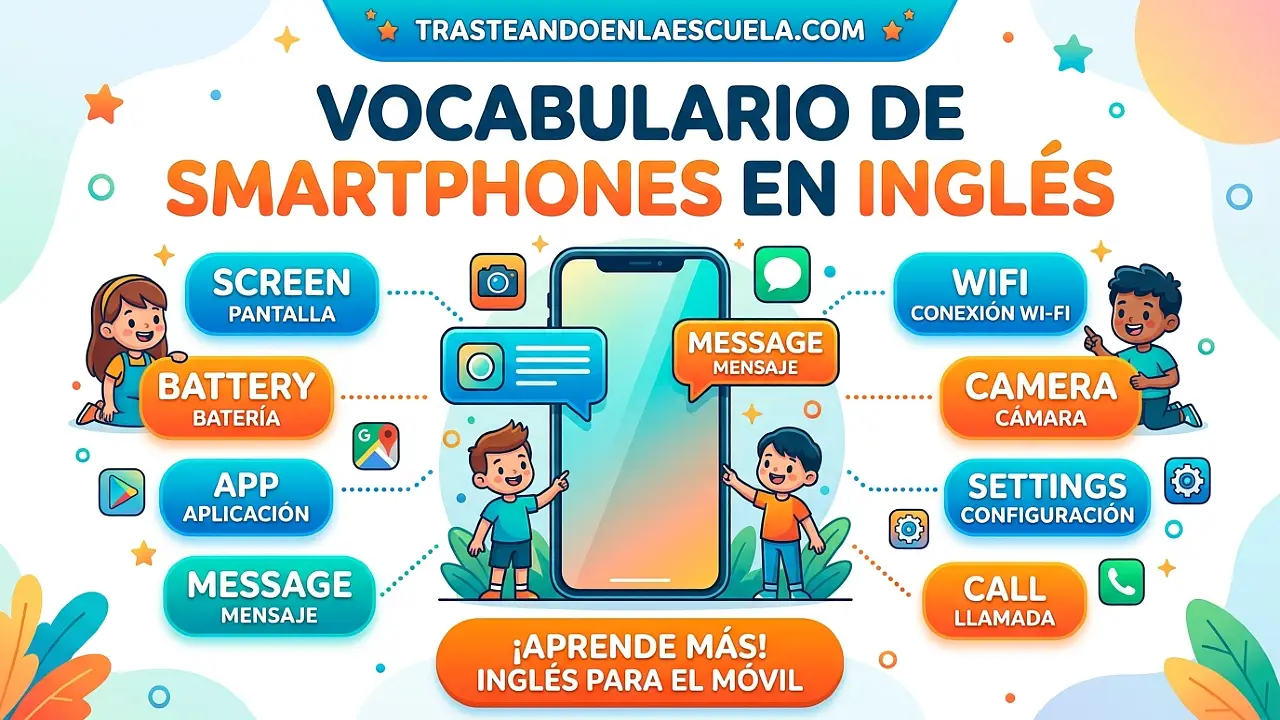
Smartphone Vocabulary: domina el vocabulario de tu móvil en inglés
El smartphone es el dispositivo que más usamos a diario. Saber cómo se llaman sus partes, los gestos táctiles, las notificaciones, la batería, la conectividad y las acciones cotidianas en inglés te ayudará a configurar tu teléfono, pedir ayuda técnica, entender tutoriales y comunicarte con fluidez en cualquier contexto digital.
🎯 En este post aprenderás: Vocabulario completo del smartphone en inglés (partes del móvil, gestos táctiles, conectividad, batería, notificaciones, ajustes, apps y mensajería), verbos clave (to swipe, to tap, to pinch, to zoom, to charge, to pair), frases útiles, y 5 ejercicios prácticos con soluciones. Además, enlaces a otros posts de la serie: Computers, Internet, Social Media y Apps & Software.
📱 Partes del smartphone (Hardware)
✋ Gestos táctiles (Touch gestures)
📱 Gestos comunes en pantalla táctil:
- Tap (tocar una vez) → seleccionar / abrir
- Double tap (tocar dos veces rápido) → zoom o like (Instagram)
- Long press (presionar y mantener) → menú contextual
- Swipe (deslizar) → mover entre pantallas o eliminar
- Scroll (desplazar con dedo) → moverse arriba/abajo
- Pinch (pellizcar con dos dedos) → zoom out (alejar)
- Spread / Reverse pinch (separar dos dedos) → zoom in (acercar)
- Drag and drop (arrastrar y soltar) → mover iconos
| Gesture (gesto) | Spanish | Example sentence |
|---|---|---|
| To tap | Tocar (una vez) | Tap the icon to open the app. |
| To double-tap | Dar doble toque | Double-tap the video to like it. |
| To long press / To press and hold | Mantener presionado | Long press the home screen to add a widget. |
| To swipe | Deslizar | Swipe left to delete the message. |
| To scroll | Desplazar | Scroll down to see more options. |
| To pinch / To zoom out | Pellizcar / alejar | Pinch the map to zoom out. |
| To spread / To zoom in | Separar dedos / acercar | Spread your fingers to zoom in on the photo. |
| To drag and drop | Arrastrar y soltar | Drag and drop the file into the folder. |
🔋 Batería y carga
📶 Conectividad
| English term | Spanish | Example |
|---|---|---|
| Wi-Fi | Red inalámbrica | Connect to the Wi-Fi network. |
| Mobile data / Cellular data | Datos móviles | I have 5GB of mobile data per month. |
| Bluetooth | Bluetooth | Pair your phone with the Bluetooth speaker. |
| Pair / To pair | Emparejar (dispositivos Bluetooth) | Go to settings to pair a new device. |
| Airplane mode | Modo avión | Turn on airplane mode during the flight. |
| Hotspot / Tethering | Compartir internet | Use your phone as a Wi-Fi hotspot. |
| NFC (Near Field Communication) | Comunicación de campo cercano | Use NFC to make contactless payments. |
| Roaming | Roaming / itinerancia | Disable roaming to avoid extra charges. |
🔔 Notificaciones y ajustes
📲 Apps y mensajería
| Term | Spanish | Example |
|---|---|---|
| App / Application | Aplicación | I downloaded a new fitness app. |
| To install | Instalar | Install the app from the App Store. |
| To uninstall | Desinstalar | Uninstall apps you don’t use. |
| To update | Actualizar | Update your apps regularly for security. |
| Home screen | Pantalla de inicio | Organize your home screen with folders. |
| App drawer (Android) | Cajón de aplicaciones (Android) | Swipe up to open the app drawer. |
| Widget | Widget (miniaplicación en pantalla) | Add a weather widget to your home screen. |
| Folder | Carpeta | Create a folder for your social media apps. |
| Text message / SMS | Mensaje de texto | Send me a text message. |
| Instant messaging | Mensajería instantánea (WhatsApp, Telegram) | We use instant messaging for work. |
| Voice message | Mensaje de voz | I sent you a voice message on WhatsApp. |
| Video call | Videollamada | Let’s have a video call later. |
📌 Diferencia clave: Text message / SMS usa la red de telefonía (no necesita internet). Instant messaging (WhatsApp, Telegram, Signal) necesita conexión a internet (Wi-Fi o datos móviles).
📸 Cámara y fotos
🗣️ Frases útiles sobre el móvil en inglés
- “My phone is about to die.” – Mi móvil está a punto de quedarse sin batería.
- “I have no signal here.” – No tengo cobertura aquí.
- “Can I borrow your charger?” – ¿Puedo pedir prestado tu cargador?
- “The screen is cracked.” – La pantalla está rota.
- “I need to top up my phone.” – Necesito recargar mi saldo (para llamadas/datos prepago).
- “My phone keeps restarting by itself.” – Mi móvil se reinicia solo constantemente.
- “Please put your phone on silent.” – Por favor, pon tu móvil en silencio.
- “I have an Android / an iPhone.” – Tengo un Android / un iPhone.
- “Turn off your phone during takeoff.” – Apaga tu móvil durante el despegue.
📋 Ejercicios prácticos para dominar el vocabulario del smartphone
📱 Ejercicio 1: Traduce las siguientes frases al inglés
- Desliza hacia arriba para abrir el cajón de aplicaciones.
- Mi batería está al 10%. Necesito activar el modo de bajo consumo.
- Empareja tus auriculares Bluetooth con el teléfono.
- Haz una captura de pantalla y envíamela por mensaje de texto.
- Mantén presionado el icono para moverlo a otra carpeta.
✅ Ver soluciones
- Swipe up to open the app drawer.
- My battery is at 10%. I need to turn on low power mode / battery saver.
- Pair your Bluetooth headphones with the phone.
- Take a screenshot and send it to me by text message.
- Long press the icon to move it to another folder.
🔋 Ejercicio 2: Elige la palabra correcta (charge / battery / charger / power bank / wireless)
- My phone is dead. I need to ________ it.
- The ________ on this phone lasts all day.
- I forgot my ________ at home. Can I use yours?
- When traveling, a ________ is useful to charge your phone without a wall outlet.
- ________ charging allows you to charge without plugging in a cable.
✅ Ver soluciones
- charge
- battery life (o simplemente battery)
- charger
- power bank
- Wireless
✋ Ejercicio 3: Relaciona cada gesto con su descripción
- Pinch
- Double-tap
- Long press
- Swipe
- Spread
Descripciones:
- Mantener presionado durante unos segundos
- Deslizar el dedo horizontal o verticalmente
- Separar dos dedos para acercar (zoom in)
- Juntar dos dedos para alejar (zoom out)
- Tocar dos veces rápidamente
✅ Ver soluciones
- Pinch → iv (zoom out)
- Double-tap → v
- Long press → i
- Swipe → ii
- Spread → iii (zoom in)
📶 Ejercicio 4: Completa las oraciones sobre conectividad
- When you are on an airplane, you should enable ________ mode.
- If you travel to another country, you might pay extra for ________.
- To share your phone’s internet with your laptop, turn on ________.
- To connect your phone to a wireless speaker, use ________.
- To save mobile data, connect to a ________ network at home or in a café.
✅ Ver soluciones
- airplane (modo avión)
- roaming
- hotspot / tethering
- Bluetooth
- Wi-Fi
📸 Ejercicio 5: Traduce las siguientes palabras al inglés (vocabulario de cámara)
- Tomar una foto
- Grabar un vídeo
- Captura de pantalla
- Modo retrato
- Cámara frontal
✅ Ver soluciones
- To take a photo / To take a picture
- To record a video
- Screenshot
- Portrait mode
- Front camera / Selfie camera
📚 Más recursos de tecnología en inglés
📘 Serie completa: Tecnología e internet
- Computers: ordenadores – Hardware, software y periféricos.
- Internet: redes y términos – Conexiones, navegación y seguridad.
- Social media: redes sociales – Posts, stories, likes y hashtags.
- Smartphone: vocabulario móvil – ¡Estás aquí!
- Apps and software: aplicaciones – Instalación, actualizaciones y bugs.
Además, te recomendamos nuestras guías de gramática como Mixed Conditionals o Enlace iónico para seguir mejorando tu inglés.
🏆 Reto final: Cambia el idioma de tu smartphone a inglés durante 10 días. Explora todos los menús, escribe notas en inglés y configura las notificaciones. Anota al menos 15 palabras nuevas que no estaban en este post y compártelas en los comentarios.
📌 Consejo adicional: Usa el asistente de voz (Siri, Google Assistant) en inglés para practicar la pronunciación de comandos como «Hey Siri, set a timer for 5 minutes» o «OK Google, turn on Bluetooth».











Publicar comentario