Computers in English: vocabulario de ordenadores y tecnología
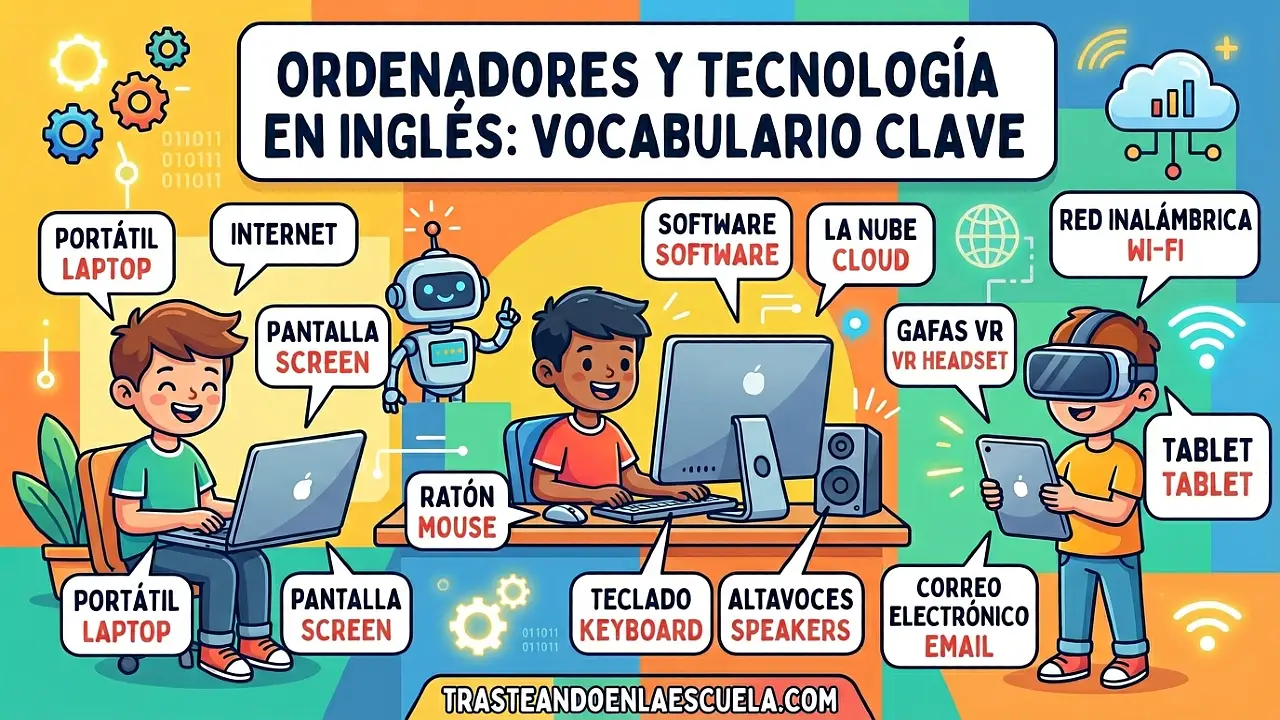
Computers in English: domina el vocabulario de ordenadores
En la era digital, saber hablar de ordenadores en inglés ya no es opcional: es esencial. Desde hardware hasta software, pasando por acciones cotidianas como to boot up o to scroll, este post te dará todas las herramientas para que puedas describir, usar y solucionar problemas de computadoras en inglés con confianza.
🎯 En este post aprenderás: Vocabulario básico y avanzado de ordenadores (hardware, software, periféricos), verbos de acción comunes, frases útiles para el día a día, diferencias entre términos similares (ej. monitor vs screen), y 5 ejercicios prácticos con soluciones detalladas. Además, encontrarás enlaces a otros posts de la serie sobre Internet, Social Media, Smartphone y Apps & Software.
🖥️ Hardware vs Software: la diferencia clave
📀 ¿Qué es Hardware? ¿Qué es Software?
Hardware (hardware): Son las partes físicas del ordenador: todo lo que puedes tocar. Ejemplos: monitor, teclado, ratón, disco duro, placa base, etc.
Software (software): Son los programas e instrucciones que le dicen al hardware qué hacer. No se pueden tocar. Ejemplos: Windows, Photoshop, Chrome, juegos.
💡 Analogía fácil: El hardware es el cuerpo del ordenador, el software es la mente (las ideas y pensamientos).
🔧 Vocabulario esencial de Hardware (partes del ordenador)
🎓 Diferencias importantes: No confundas screen (pantalla en general) con monitor (periférico externo). Tampoco confundas hard drive (disco duro tradicional) con SSD (más moderno y rápido). En inglés técnico, memory suele referirse a RAM, y storage al disco duro/SSD.
🧩 Periféricos y accesorios comunes
| Peripheral (periférico) | Spanish | Example sentence |
|---|---|---|
| Printer | Impresora | My printer is out of ink. |
| Scanner | Escáner | I scanned the document. |
| Speakers | Altavoces | The speakers are very loud. |
| Headphones / Headset | Auriculares / cascos con micrófono | I use headphones for online classes. |
| Webcam | Cámara web | My webcam has 1080p resolution. |
| Microphone | Micrófono | Please unmute your microphone. |
| USB flash drive | Memoria USB / pendrive | Copy the file to the USB drive. |
| External hard drive | Disco duro externo | I backup my data on an external drive. |
| Docking station | Base de acoplamiento | Connect your laptop to the docking station. |
💽 Vocabulario de Software y programas
⚙️ Verbos y acciones esenciales en el ordenador
| Verb (infinitive) | Spanish | Example |
|---|---|---|
| To boot up / To start up | Encender / iniciar | My computer takes 30 seconds to boot up. |
| To shut down | Apagar | Always shut down your PC properly. |
| To restart / To reboot | Reiniciar | Please restart your computer after the update. |
| To log in / To sign in | Iniciar sesión | Log in with your username and password. |
| To log out / To sign out | Cerrar sesión | Don’t forget to log out on public computers. |
| To click | Hacer clic | Click on the icon to open it. |
| To double-click | Hacer doble clic | Double-click the file to open it. |
| To right-click | Clic derecho | Right-click for more options. |
| To drag and drop | Arrastrar y soltar | Drag and drop the file into the folder. |
| To scroll | Desplazarse (con rueda o barra) | Scroll down to see more content. |
| To type | Escribir (tecleando) | Type your password carefully. |
| To save | Guardar | Save your work frequently. |
| To delete / To remove | Eliminar / borrar | Delete temporary files to free up space. |
| To copy / To paste | Copiar / pegar | Copy the text and paste it into Word. |
| To install | Instalar | How do I install this software? |
| To uninstall | Desinstalar | Uninstall programs you don’t use. |
| To download | Descargar | Download the file from the website. |
| To upload | Subir (enviar a internet) | Upload your homework to the cloud. |
| To crash | Bloquearse / fallar | My computer crashed and I lost my work. |
| To freeze | Congelarse | The screen froze, so I restarted. |
🗣️ Frases útiles para el día a día en inglés
- “My computer is running slow.” – Mi ordenador va lento.
- “Can you help me fix my laptop?” – ¿Puedes ayudarme a arreglar mi portátil?
- “I need to upgrade my RAM.” – Necesito ampliar la memoria RAM.
- “The Wi-Fi connection keeps dropping.” – La conexión Wi-Fi se cae constantemente.
- “I can’t find the file. Where did you save it?” – No encuentro el archivo. ¿Dónde lo guardaste?
- “Please back up your data regularly.” – Por favor, haz copias de seguridad regularmente.
- “The printer is offline.” – La impresora está fuera de línea.
📋 Ejercicios prácticos para dominar el vocabulario de ordenadores
📝 Ejercicio 1: Traduce las siguientes frases al inglés
- Mi ordenador de sobremesa tiene 32 GB de RAM y un disco duro de 1 TB.
- Haz clic derecho en el icono y selecciona «propiedades».
- Después de instalar la actualización, el sistema se reinició solo.
- Guarda el archivo en una carpeta nueva antes de subirlo a la nube.
- Mi portátil se congela cuando abro muchas pestañas en el navegador.
✅ Ver soluciones
- My desktop computer has 32 GB of RAM and a 1 TB hard drive.
- Right-click on the icon and select «properties».
- After installing the update, the system restarted by itself.
- Save the file in a new folder before uploading it to the cloud.
- My laptop freezes when I open many tabs in the browser.
🖱️ Ejercicio 2: Completa las oraciones con la palabra correcta (hardware/software/peripheral)
- A ________ is an example of an input peripheral. (mouse / operating system)
- Windows 11 is an ________. (SSD / operating system)
- If you want more storage, you can buy an external ________. (hard drive / browser)
- To hear audio, you need ________ or headphones. (speakers / drivers)
- The ________ processes all the instructions of a program. (CPU / folder)
✅ Ver soluciones
- mouse (ratón → periférico de entrada)
- operating system (sistema operativo)
- hard drive (disco duro externo)
- speakers (altavoces)
- CPU (procesador)
⌨️ Ejercicio 3: Elige el verbo correcto (drag, click, scroll, boot, shut down)
- Please ________ down to read the entire article.
- ________ the file and drop it into the «Documents» folder.
- Don’t forget to ________ your computer before unplugging it.
- ________ the Start button to open the menu.
- It takes almost two minutes for my old laptop to ________ up.
✅ Ver soluciones
- scroll (desplazarse)
- Drag (arrastrar)
- shut down (apagar)
- Click (hacer clic)
- boot (iniciar / arrancar)
💾 Ejercicio 4: Identifica el error en cada frase y corrígelo
- I need to install a new hard drive because my RAM is full.
- Please save the document on the mouse.
- My screen is very slow, I think I need a better processor.
- To open the file, right-click once on the icon.
- You should uninstall your operating system every week for security.
✅ Ver soluciones
- Error: «RAM is full» → lo correcto es «hard drive is full» (la RAM no se llena de archivos, es memoria temporal). Frase corregida: I need to install a new hard drive because my hard drive is full.
- Error: «save on the mouse» → save on the computer / hard drive / USB drive. Corregida: Please save the document on the computer.
- Error: «screen is very slow» → la pantalla no es lenta, lo que va lento es el ordenador. Corregida: My computer is very slow, I think I need a better processor.
- Error: «right-click once» → para abrir normalmente se hace doble clic izquierdo. Right-click abre menú contextual. Corregida: To open the file, double-click on the icon.
- Error: desinstalar el sistema operativo semanalmente no es normal. Corregida: You should update your operating system regularly for security.
🖨️ Ejercicio 5: Relaciona cada problema con su posible solución (en inglés)
Une con flechas (escribe la letra correspondiente):
- My computer won’t turn on.
- The printer is not printing.
- I can’t hear anything from my speakers.
- My mouse cursor doesn’t move.
- I forgot my password to log in.
Posibles soluciones:
- 1. Check the audio drivers and volume level.
- 2. Use the «Forgot password» option or reset it.
- 3. Check the power cable and power supply.
- 4. Make sure the printer has paper and ink, and it’s connected.
- 5. Check the USB port or replace the batteries (if wireless).
✅ Ver soluciones
- a → 3 (Check the power cable and power supply)
- b → 4 (Make sure the printer has paper and ink, and it’s connected)
- c → 1 (Check the audio drivers and volume level)
- d → 5 (Check the USB port or replace the batteries)
- e → 2 (Use the «Forgot password» option)
🌐 Más vocabulario tecnológico en nuestra web
📚 Serie completa: Tecnología e internet en inglés
Sigue aprendiendo con el resto de posts del cluster:
- Computers: ordenadores – ¡Estás aquí!
- Internet: redes y términos – Todo sobre conexiones, navegación y seguridad online.
- Social media: redes sociales – Domina el vocabulario de Facebook, Instagram, TikTok y más.
- Smartphone: vocabulario móvil – Desde pantalla táctil hasta apps de mensajería.
- Apps and software: aplicaciones – Instalación, actualizaciones, bugs y productividad.
Además, no te pierdas nuestras guías de gramática como Mixed Conditionals o fórmulas geométricas si quieres seguir practicando inglés en otros contextos.
🏆 Reto final: Cambia el idioma de tu ordenador o navegador a inglés durante una semana. Anota cada palabra nueva que aprendas y escribe 5 frases originales usando el vocabulario de este post. Verás cómo tu fluidez técnica mejora rápidamente.
📌 Recuerda: La práctica constante es la clave. Usa estos términos en tus conversaciones diarias o en foros de tecnología en inglés como Reddit o Stack Overflow.










Publicar comentario